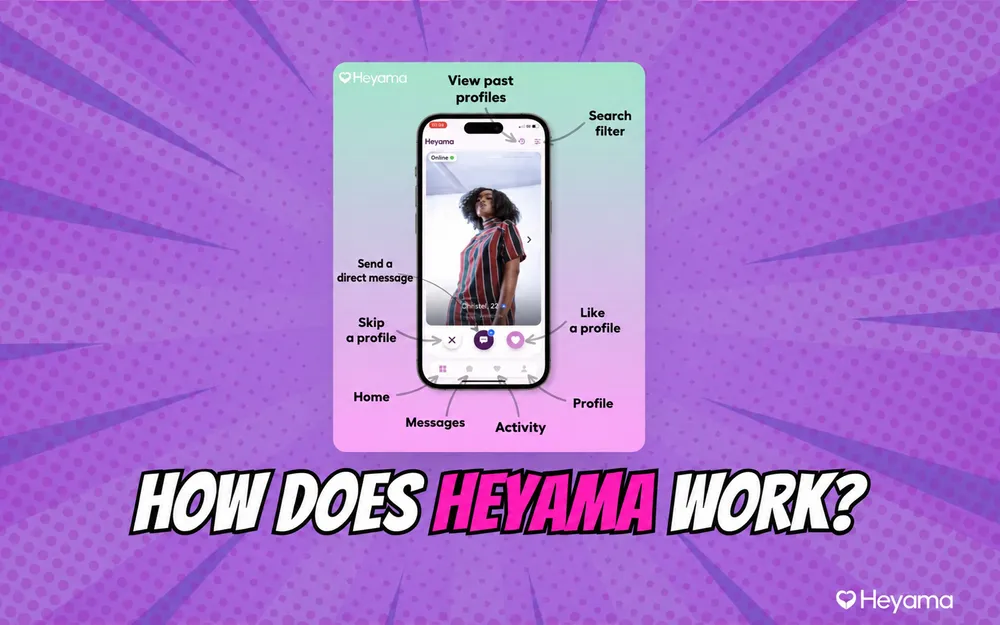
How does Heyama work? Once you have downloaded Heyama and created your account, you land on the Dates screen, ready to meet new people. Here is how to interact with profiles and make the most of every feature in the app.
How to interact with profiles on Heyama
- The heart: if a profile interests you after looking at it closely, tap the heart. If that person likes you back, it's a match, and you can chat for free in the Chats tab.
- The DM: use a DM to really show your interest in a profile. It lets you send a message before you even match, with the "Send a DM" button between the cross and the heart. A DM costs 200 coins, and the person replies for free. If they reply positively, a conversation opens straight away. To do it well, read how to contact a profile on Heyama.
- The cross: if a profile does not interest you, tap the cross.
Heyama's advanced features
- Favourites let you save a profile you have liked, so you can send them a message later. Tap the star on a profile, then find your favourites (10 at most) in Activity > Favorites. No more regrets about not starting the conversation right away!
- History lets you look again at the profiles you passed in the last 7 days, using the curved arrow at the top right of the Dates screen (called Rewind in the app). Handy if you want to reconsider: liking one of them costs 100 coins.
- Filters let you search for profiles by city, age, intention and more.
- The Chats tab is where you chat with your matches.
- In Activity, you find four tabs: DMs, Likes, Views (who visited your profile) and Favorites.
- The Profile tab lets you see your profile and edit it when needed.
- Coins help you get more out of your interactions and unlock exclusive features.
- Finally, Incognito mode is a paid 3, 6 or 12-month pack that lets you browse profiles anonymously. When it is on, your profile is only visible to people you have liked or sent a DM.
Heyama on video
To see the app in action, watch our walkthrough video: