At Heyama, we know connections don't always happen at the right moment. Maybe you came across an interesting profile and sent a like, but couldn't send a message right then. What if that profile disappeared before you made the first move? That's where our brand-new feature comes in: Favourites on Heyama!
How do Favourites work?
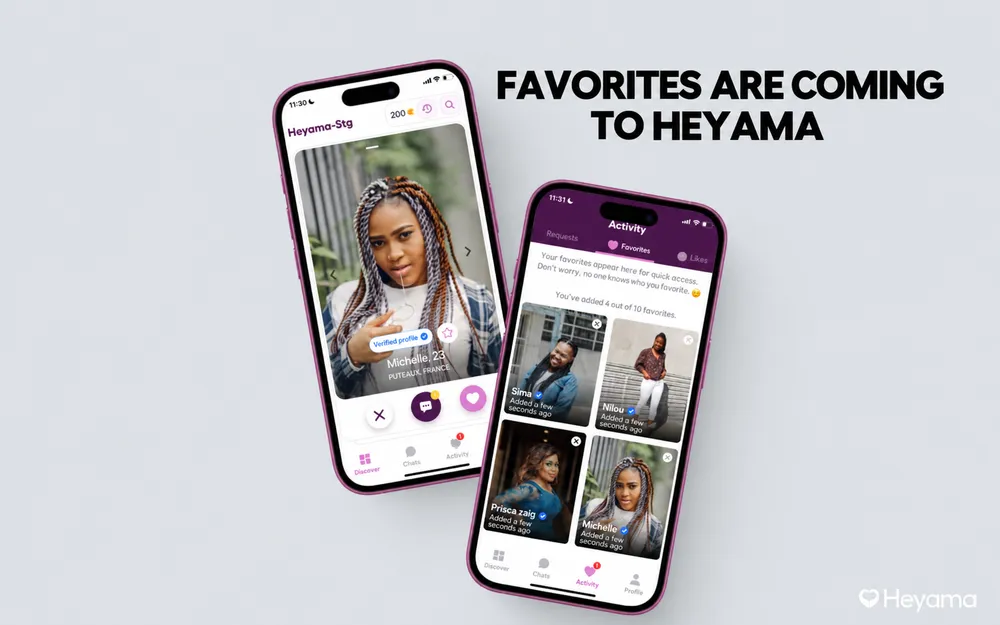
Favourites let you save a profile you've sent a like to, so you can message them later. No more regrets about not starting the conversation straight away! Here's how to use them:
- Add a profile to Favourites: when you like a profile, tap the star icon next to their name.
- Find your saved profiles: all your favourite profiles are available in the "Activity" tab, in the "Favourites" section.
- Send a DM later: once a profile is in your Favourites, you can send them a private message whenever you like, boosting your chances of a reply and a match!
- Manage your Favourites list: you can save up to 10 profiles in Favourites. If you change your mind, tap the star icon again to remove a profile from your list.
Why use Favourites on Heyama?
- Never miss an opportunity: even when you're in a hurry or busy, add a profile to your Favourites and come back when you have time to chat.
- Increase your chances of matching: a DM sent at the right moment can make all the difference!
- Stay in control of your conversations: pick the profiles that interest you most and give yourself a second chance to contact them.
Favourites on video
The Favourites feature is here to help you connect more easily. So, ready to never let a crush slip away again? Try this new option now and start saving your favourite profiles on Heyama!